How to Create a Stunning Double Exposure Effect Photo in Just 5 Seconds Using ChatGPT and Google Gemini
Photo editing has become easier than ever thanks to the power of Artificial Intelligence. If you’ve ever admired those eye-catching double exposure portraits where a large face blends beautifully with a smaller full-body image and a dreamy background, you’ll be surprised to know that you can create the same effect in just a few seconds using ChatGPT and Google Gemini.
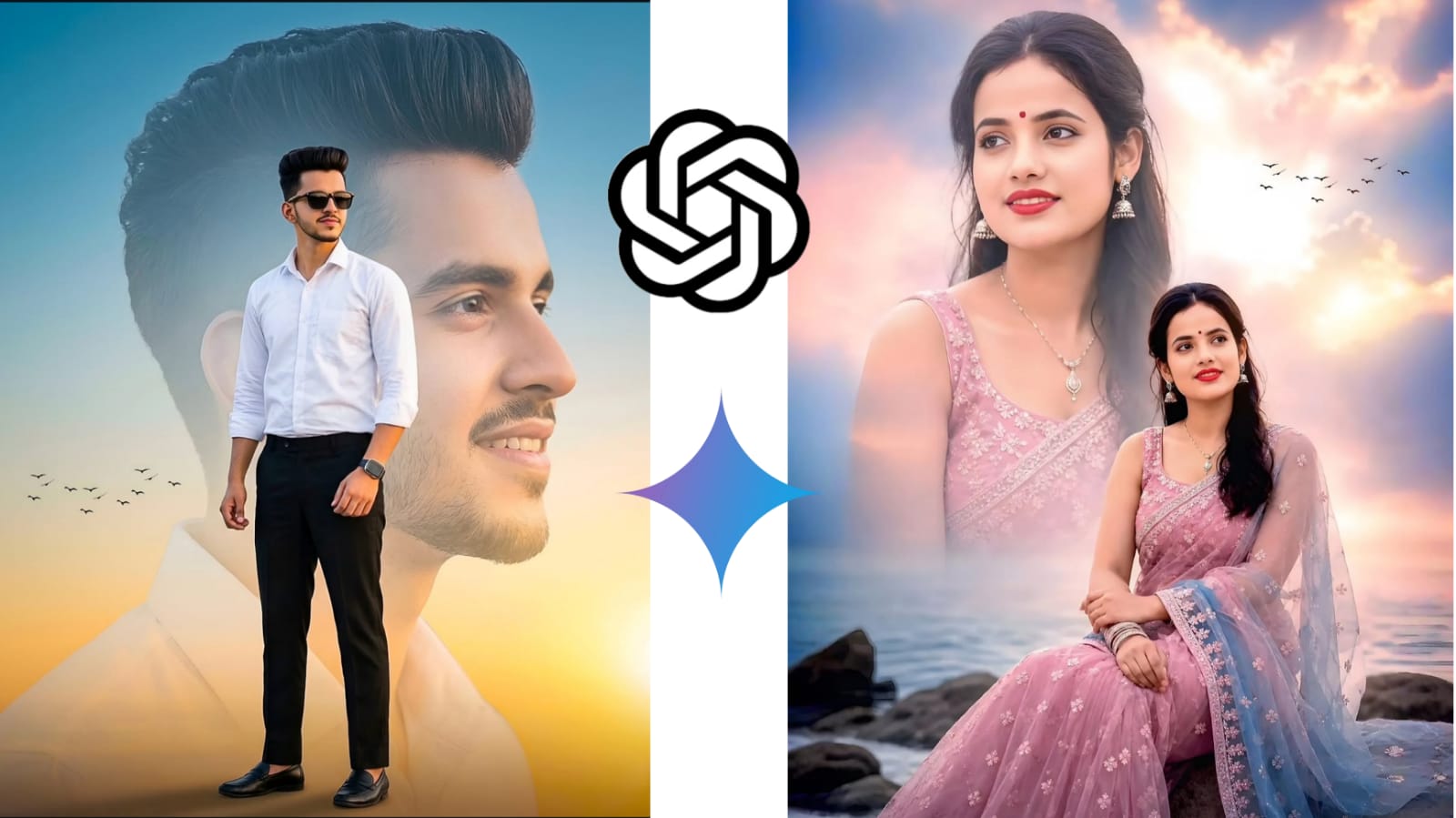
The image above is a perfect example of a modern AI-generated double exposure effect. It combines a large portrait with a full-body pose, soft lighting, and a cinematic background to create a professional and artistic look without requiring advanced Photoshop skills.
What Is a Double Exposure Effect?
Double exposure is a photography and editing technique that combines two or more images into a single frame. Traditionally, photographers created this effect using film cameras, but today AI tools can generate it instantly.
In the featured image, the larger portrait serves as the background layer, while the smaller standing or sitting portrait is placed in the foreground. The soft blending, vibrant colors, and dreamy atmosphere make the final result look highly professional.
Why Use AI for Double Exposure Editing?
AI-powered tools like ChatGPT and Google Gemini can generate detailed editing prompts that help create stunning artwork automatically. Instead of spending hours masking, blending, and color grading in editing software, you can simply upload your photo and use a well-crafted prompt.
Benefits:
- No Photoshop skills required
- Creates professional results instantly
- Saves time and effort
- Generates cinematic backgrounds automatically
- Perfect for social media posts, YouTube thumbnails, and profile pictures
How to Create the Effect in 5 Seconds
Step 1: Upload Your Photo
Open ChatGPT or Google Gemini and upload a clear portrait photo. High-resolution images generally produce the best results.
Step 2: Copy and Paste an AI Prompt
Use a prompt similar to this:
Step 3: Generate the Image
Click generate and wait a few seconds. The AI will automatically blend the images and create the double exposure effect.
Step 4: Download and Share
Once the image is generated, download the final result and share it on Instagram, Facebook, YouTube, or any social media platform.
Tips for Better Results
- Use photos with good lighting.
- Choose high-resolution portraits.
- Add cinematic keywords such as “golden hour,” “dreamy sky,” or “soft glow.”
- Mention color themes like blue-orange or pastel tones.
- Request realistic facial details for a professional finish.
Final Thoughts
AI has completely transformed photo editing, making complex effects accessible to everyone. The double exposure effect shown in the image can now be created in just a few seconds using ChatGPT and Google Gemini. Whether you’re a content creator, photographer, or social media enthusiast, this technique allows you to create stunning visual artwork without any advanced editing knowledge.
With the right prompt and a quality portrait photo, you can produce professional-looking double exposure images that stand out instantly. Give it a try and turn ordinary portraits into extraordinary works of art with the power of AI.
Copy & Paste AI Prompt
Want to create this stunning double exposure effect instantly? Copy and paste the prompt below into ChatGPT, Google Gemini, or any AI image editor
A high-quality cinematic double exposure
portrait of a stylish young man. In the foreground, he is standing confidently wearing a crisp white button-down shirt, black formal trousers, black loafers, and dark sunglasses. In the background, a large, faded, and dreamy close-up profile of his face looking sideways with a gentle smile. The setting is a golden
hour sunset with a soft yellow and blue gradient sky. Small silhouettes of birds are flying in the distance. Professional lighting, 8k resolution, shallow depth of field, and sharp details.” The photo in the background should be slightly faded from the bottom. The boy should also have a beautiful smart watch on his left hand. The sleeves of the boy’s shirt should be folded.
Pro Tip
For even better results, upload a high-resolution portrait photo with good lighting and a clean background. This helps AI generate sharper facial details and a more realistic double exposure effect.